http://www.rollershutters.com.au/ "Keeping you cool, keeping you
warm, keeping you safe"

Programming Mode

How to program a single or a four channel hand held remote

Before you begin

Motors are shipped without the up and down stop limit set.
Steps 1 to 7 must be completed to ensure proper shutter programming and functionality. Power should ONLY be connected to current shutter being programmed.

Please note:If the shutter height limit is not set correctly, the bottom bar of the curtain has a bottom bar V stopper each side, which stops the curtain from going completely into the head box, but this causes the motor to jam and stop, this should be avoided and the up limit set to stop the curtain before this happens.

Please note: The Box Locking System must be set at the correct position. Please read
The Box Locking System and the Slat locking System

Step 1

Connect the shutter being programmed to the power.
When programming a multi channel remote select the required channel.

Step 2

Remote

Initiate programming.

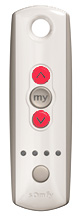
Press bothupand down at the same time
until the shutter jogs.

A jog is a brief up and down motion of the shutter's curtain.

In Programming Mode,
the shutter will move only when theup ordown is held.


Step 3

Remote my

Check direction

Pressup or.down When pressingdown the shutter should
go down.

To change direction press and hold my button(Stop)
until the shutter jogs, & the direction is reversed. This could take up to 5 seconds.

A jog is a brief up and down motion of the curtain.


Step 4

Remote down

Set the Up limit

Bring the shutter to desired upper limit stop point. You can adjust by pressingup ordown

Press both my button (Stop) anddown until the motor moves, then release.

(If the shutter stops when the buttons are released take it back to the upper limit and repeat)


Step 5

Remote up

Set down limit

  Stop the motor when reaching the desired lower limit.

You can adjust by pressingup ordown

Press bothmy button(Stop) andup at the same time
until the shutter moves, then release.


Step 6

Remote my

Confirm Limit setting

Press and holdmy button(stop) until the shutter jogs to confirm the limit settings.


A jog is a brief up and down motion of the shutter's curtain.


Step 7

Remote prog

Set user mode

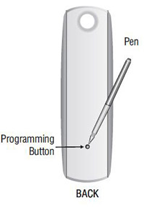
Press and hold the programming button on the back of the transmitter until the shutter jogs. The shutter is now in User Mode.

In User Mode, the shutter will operate with a brief press on upor down

Double check limit settings as a precaution.

Repeat the above process until all your shutters are programmed


How to program all 4 channels

After you have programmed all your shutters individually (with the help from the information above) you are now ready to program all 4 channels, this will allow you to operate all your shutter at the same time.

Step 1

Select channel 1 then press the program button on the back of the hand held remote for 5 seconds, the motor will move, then press the channel button on the front of the hand held remote until all four lights are illuminated, then press the programming button on the rear of the hand held remote for half a second, the motor will move, you have now programmed the first channel to channel 5. Repeat this process with the remaining channels, after this process all shutters will open and close at the same time when channel 5 is selected.


How to add multiple remotes to your automated roller shutter

STEP 1

Using a paperclip or pen, press and hold the PROGRAM BUTTON on the remote that has been programmed until the roller shutter jogs.

STEP 2

Using a paperclip or pen, press and hold the PROGRAM BUTTON on the NEW REMOTE until the roller shutter jogs. The NEW REMOTE is now configured, and can be used to operate your roller shutters.